أول widget ليك على الشاشة الرئيسيةYour first home screen widget
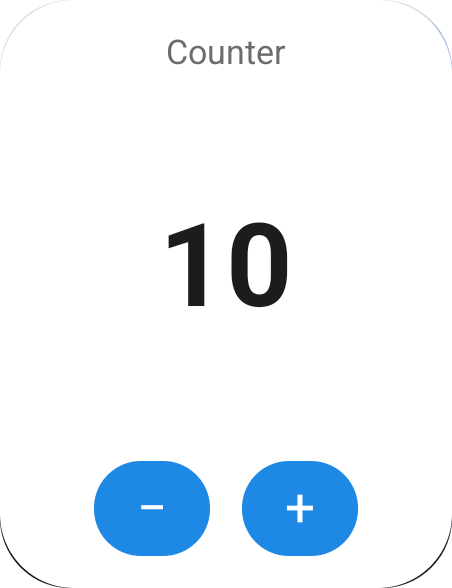
في آخر الصفحة دي هيبقى عندك widget اسمها Counter على الشاشة الرئيسية. فيها رقم وزرارين + و −، والزراير بتشتغل من غير ما الأبليكيشن يفتح. هتاخد منك حوالي 10 دقايق.
By the end of this page you'll have a Counter widget on your home screen: a number with + and − buttons that work without opening your app. It takes about 10 minutes.
ده نفس الـ 6 خطوات اللي تحت، في دقيقة. الكلام اللي في الـ terminal هو اللي الأوامر بتطبعه فعلًا، وآخر مشهد تسجيل حقيقي من Android 15.
The same six steps as below, in one minute. The terminal text is what the commands really print; the last scene is a real Android 15 recording.
قبل ما تبدأBefore you start
محتاج إيهWhat you need
مشروع Flutter عادي (أو اعمل واحد جديد بـ flutter create my_app). ولو هتبني لـ iOS لازم يكون Xcode متسطّب، بس مش هتحتاج تفتحه.
Any Flutter app (or a new one: flutter create my_app). To build for iOS, Xcode must be installed, but you won't open it.
الفكرة في 3 سطورThe idea in three lines
- انت بتوصف شكل الـ widget بـ Dart، في ملف واحد.
- أداة
build_runnerبتحوّل الوصف ده لكود native لأندرويد و iOS، وبتعمل class في Dart تبعت بيه الداتا. - الأبليكيشن بتاعك بيبعت الداتا للـ widget بسطر واحد، زي
CounterWidget.save(count: 5).
- You describe the widget in Dart, in one file.
build_runnerturns that into native Android and iOS code, plus a Dart class for sending data.- Your app sends data with one line, like
CounterWidget.save(count: 5).
انت هتكتب 3 ملفات بس: pubspec.yaml و lib/widgets.dart و lib/main.dart. أي ملفات تانية بتتعدّل لوحدها، وفيه ملخص بكل ده بعد الخطوات.
You'll write only three files: pubspec.yaml, lib/widgets.dart and lib/main.dart. Everything else is changed for you; there's a recap of all of it after the steps.
pubspec.yaml
ثبّت الباكدجاتInstall the packages
شغّل الأمرين دول في فولدر المشروع:
Run these two commands in your project folder:
flutter pub add flutter_native_widget
flutter pub add dev:flutter_native_widget_gen dev:build_runnerpubspec.yaml هتلاقي الـ 3 باكدجات دول (الأرقام ممكن تختلف عندك):pubspec.yaml now lists these three packages (your versions may differ):dependencies:
flutter_native_widget: ^0.1.0 # used by your app while it runs
dev_dependencies:
flutter_native_widget_gen: ^0.1.0 # the generator, build time only
build_runner: ^2.4.0 # runs the generatorليه واحدة بس في dependencies؟ لأنها الوحيدة اللي الأبليكيشن بيستخدمها وهو شغّال. التانيين بيشتغلوا على جهازك بس. ومش محتاج تضيف home_widget، لأنه بييجي لوحده.
Why only one in dependencies? It's the only one your app uses while running; the other two only run on your machine. You don't need to add home_widget: it comes along.
جهّز المشروعSet up the project
iOS محتاج "Widget Extension" (target منفصل جوه مشروع Xcode) علشان يعرض widgets. الأمر ده بيعمله وبيربطه بالأبليكيشن، بدل ما تعمل ده بإيدك في Xcode. وعلى أندرويد بيجهّز الملفات بس. مش محتاج تعدّل أي حاجة بعده.
iOS needs a "Widget Extension" (a separate target in the Xcode project) to show widgets. This command creates and connects it so you don't click through Xcode. On Android it only prepares files. You don't need to edit anything afterwards.
مش هتحتاج تشغّله تاني، حتى لو ضفت widgets جديدة.
You won't run it again, even when you add more widgets.
dart run flutter_native_widget_gen initCreated flutter_native_widget.yaml، وبعده قايمة بالملفات اللي اتعدّلت، وفي الآخر Done. وهتلاقي فولدر جديد اسمه ios/FNWWidgets/.Created flutter_native_widget.yaml, a list of updated files and Done., and there's a new ios/FNWWidgets/ folder.إيه اللي جوه flutter_native_widget.yaml؟What's in flutter_native_widget.yaml?
# flutter_native_widget settings.
ios:
  # Shared storage between the app and the widget extension.
  # Must be enabled for your team (Xcode's automatic signing does this).
  app_group: group.com.example.app
  # deployment_target: '16.0'
# android:
#   namespace: com.example.app   # detected from android/app/build.gradle
#   main_activity: com.example.app.MainActivity
مش محتاج تعدّل الملف ده في الشرح ده. الـ App Group هو مكان مشترك الأبليكيشن والـ widget بيقروا منه نفس الداتا، واسمه بيتعمل لوحده من الـ bundle id بتاعك.
You don't need to edit this file for this tutorial. An App Group is a shared space the app and the widget both read the same data from; its name is made from your bundle id.
lib/widgets.dart
اكتب الـ widgetWrite the widget
اعمل ملف جديد اسمه lib/widgets.dart وانسخ فيه الكود ده. الـ displayName و description هما اللي بيظهروا في قايمة الـ widgets، و sizes المقاسات المسموحة. وفيه 6 أجزاء مترقّمة في التعليقات:
Create lib/widgets.dart and paste this in. displayName and description show in the widget picker, and sizes lists the allowed sizes. It has six parts, numbered in the comments:
- الـ import بتاع الباكدج.
- سطر
part: بيشاور على ملف هيتعمل في الخطوة الجاية. لازم يبقى بنفس اسم ملفك وآخره.fnw.dart. fields: الداتا اللي بتتغير. لما تكتب{count}جوه نص، بتتبدّل بقيمة الحقل.layout: شكل الـ widget. لازم يبقى ثابت (const)، فمينفعش تحط فيه متغيرات.onTap: بيحصل إيه لما تدوس على الـ widget نفسها. هنا بيفتح الأبليكيشن بس. الـ'/counter'بيتبعت للأبليكيشن لو حبيت تستخدمه، ومش لازم يكون عندك route بالاسم ده.class Counter {}: فاضية بس لازم تبقى موجودة. هتعرف ليه في خطوة 4.
- The import of the package.
- The
partline: points to a file created in the next step. Must match your file name, ending in.fnw.dart. fields: the data that changes.{count}in text is replaced by the field's value.layout: what it looks like. Must be fixed (const): no variables.onTap: what happens when the widget itself is tapped. Here it just opens your app;'/counter'is passed along in case you want it, and you don't need a route with that name.class Counter {}: empty, but required. Step 4 explains why.
// ① The DSL
import 'package:flutter_native_widget/flutter_native_widget.dart';

// ② The generated file. Must match this file's name.
part 'widgets.fnw.dart';

@HomeScreenWidget(
  displayName: 'Counter',                  // shown in the widget picker
  description: 'Tap + and − right on the home screen',
  sizes: [NWSize.small],
  // ③ Data that changes
  fields: [NWField.integer('count')],
  // ④ What it looks like (const)
  layout: NWColumn(
    mainAxisAlignment: NWMainAxisAlignment.spaceBetween,
    children: [
      NWText('Counter', style: NWTextStyle(size: 13, color: NWColor.secondaryLabel)),
      NWText('{count}', style: NWTextStyle(size: 44, weight: NWFontWeight.bold)),
      NWRow(spacing: 12, children: [
        NWButton(action: NWAction.decrement('count', min: 0), child: NWText('−')),
        NWButton(action: NWAction.increment('count', max: 99), child: NWText('+')),
      ]),
    ],
  ),
  // ⑤ Tapping the widget itself opens your app
  onTap: NWAction.openApp('/counter'),
)
// ⑥ The name. Becomes CounterWidget after generating.
class Counter {}part. ده طبيعي، لأن الملف ده لسه ماتعملش، والأحمر هيختفي في الخطوة الجاية.part line in red. That's expected: that file doesn't exist yet. It goes away in the next step.ولّد الكودGenerate the code
الأمر ده بيقرا lib/widgets.dart، ويكتب الكود الـ native لأندرويد و iOS، ويكتب ملفين Dart جداد.
This reads lib/widgets.dart and writes the native Android and iOS code plus two new Dart files.
dart run build_runner buildBuilt with build_runner، وهتلاقي ملفين جداد هما lib/widgets.fnw.dart و lib/home_widgets.g.dart، والأحمر اختفى.Built with build_runner, two new files exist (lib/widgets.fnw.dart and lib/home_widgets.g.dart), and the red underline is gone.dart run build_runner watch شغّال. وبعدها اعمل build كامل للأبليكيشن، لأن الـ hot reload مابيوصلش للكود الـ native.dart run build_runner watch running), then fully rebuild the app: hot reload doesn't reach native code.إيه اللي حصل؟ CounterWidget جه منين؟What just happened? Where did CounterWidget come from?
انت ماكتبتش CounterWidget. الـ generator خد اسم الـ class اللي كتبتها (Counter)، وزوّد عليه Widget، وكتبه في lib/widgets.fnw.dart. وملفك بيشوفه عن طريق سطر part.
You didn't write CounterWidget. The generator took your class name (Counter), added Widget, and wrote it into lib/widgets.fnw.dart. Your file sees it through the part line.
@HomeScreenWidget(
  fields: [NWField.integer('count')],
  layout: …,
)
class Counter {}CounterWidgetفيlib/widgets.fnw.dart:saveوreadوclearوupdateinlib/widgets.fnw.dart:save,read,clear,updateCounterDataالليread()بترجّعه، وفيهcountwhatread()returns, withcountCounterWidgetProviderالـ widget على أندرويدthe Android widgetFNWCounterWidgetالـ widget على iOSthe iOS widget
القاعدةThe rule
اسم الـ class + Widget. يعني Weather تبقى WeatherWidget، و PrayerTimes تبقى PrayerTimesWidget.
Class name + Widget. Weather → WeatherWidget, PrayerTimes → PrayerTimesWidget.
الـ class فاضية ليه؟Why is the class empty?
هي مجرد اسم بتتحط عليه الـ annotation، ومش هتستخدمها أبدًا. من غيرها الـ generator مش هيلاقي حاجة يولّدها.
It is just a name tag the annotation sits on. You never use it, but without it the generator finds nothing.
بيوصل للكود بتاعك إزاي؟How does it reach your code?
عن طريق السطر part 'widgets.fnw.dart';. ده بيخلّي الملف المتولّد جزء من ملفك، فأي ملف بيعمل import لـ widgets.dart يشوف CounterWidget.
Through part 'widgets.fnw.dart';: the generated file becomes part of yours, so anything importing widgets.dart sees CounterWidget.
lib/main.dart
عدّل lib/main.dartUpdate lib/main.dart
هتعمل حاجتين في الملف ده:
Two changes in this file:
- شغّل الباكدج: ضيف السطور اللي عليها
← add، وغيّرvoid main()لـFuture<void> main() async. الـinitializeHomeWidgets()اتعملت في خطوة 4، ولازم تتنادى قبلrunApp. - زرار يبعت رقم للـ widget: ضيف
import 'widgets.dart';فوق جنب الـ imports التانية، وحط الزرار ده جوه أيbuild(). في مشروعflutter createحطه تحت الـTextاللي فيMyHomePage.
- Start the package: add the lines marked
← addand changevoid main()toFuture<void> main() async.initializeHomeWidgets()was generated in step 4; call it beforerunApp. - A button that sends a number to the widget: add
import 'widgets.dart';at the top with the other imports, and put this button inside anybuild(). In aflutter createapp, put it under theTextwidgets inMyHomePage.
import 'package:flutter/material.dart';
import 'home_widgets.g.dart';                   // ← add
import 'widgets.dart';                          // ← add (for CounterWidget)

Future<void> main() async {                    // ← was: void main() {
  WidgetsFlutterBinding.ensureInitialized();    // ← add
  await initializeHomeWidgets();                // ← add
  runApp(const MyApp());
}
وبعدين جوه build() بتاعة MyHomePage، تحت الـ Text. الفاصلة اللي في الآخر علشان الزرار بيتحط جوه قايمة children:.
Then inside MyHomePage's build(), under the Text widgets. The trailing comma is there because it goes inside a children: list.
ElevatedButton(
  onPressed: () => CounterWidget.save(count: 5),
  child: const Text('Set the widget to 5'),
),شغّل وجرّبRun and try it
- شغّل الأبليكيشن بـ
flutter run. - ضيف الـ widget بإيدك، لأن الأبليكيشن مابيحطهاش لوحده. على أندرويد: دوسة طويلة على الشاشة الرئيسية ← Widgets ← اسم الأبليكيشن. وعلى iOS: دوسة طويلة ← Edit ← Add Widget ← اسم الأبليكيشن. ولازم الأبليكيشن يكون اتفتح مرة واحدة على الأقل.
- دوس + على الـ widget نفسها.
- افتح الأبليكيشن ودوس Set the widget to 5.
- Run the app:
flutter run. - Add the widget yourself; the app doesn't place it. Android: long-press the home screen → Widgets → your app. iOS: long-press → Edit → Add Widget → your app (the app must have been opened once).
- Tap + on the widget itself.
- Open the app and tap Set the widget to 5.
اختياري (أندرويد): زرار في الأبليكيشن يضيف الـ widgetOptional (Android): a button in your app that adds the widget
ده بيستخدم home_widget مباشرةً، علشان كده هنا بس لازم تضيفه: flutter pub add home_widget.
This calls home_widget directly, so only here you add it: flutter pub add home_widget.
import 'package:home_widget/home_widget.dart';
import 'home_widgets.g.dart';   // homeWidgetSpecs
import 'widgets.dart';          // CounterWidget

final spec = homeWidgetSpecs.firstWhere((s) => s.name == CounterWidget.name);
await HomeWidget.requestPinWidget(qualifiedAndroidName: spec.androidProvider);
ملخص: إيه اللي اتغيّر في مشروعك؟Recap: what changed in your project?
كل ملف اتعدّل في الخطوات، مقسومين حسب مين عدّله. اعمل commit ليهم كلهم زي أي كود. ولو حبيت تشيل كل حاجة، أمر clean بيرجّع المشروع زي ما كان.
Every file the steps touched, grouped by who changed it. Commit them all like any other code; clean undoes everything.
انت بتكتبهاYou write these
بإيدك، زي أي كود Flutter عادي.
By hand, like any Flutter code.
pubspec.yamlبتضيف فيه الباكدجات (خطوة 1)add the packages (step 1)lib/widgets.dartشكل الـ widgets بتاعتك (خطوة 3). الاسم ده مجرد مثال، وممكن تسميه أي اسمwhat your widgets look like (step 3); this name is just an examplelib/main.dartبتشغّل فيه الباكدج وبتضيف زرار (خطوة 5)starts the package and adds a button (step 5)
init بيعدّلها مرة واحدةinit changes these once
علشان iOS محتاج target مخصوص للـ widgets. وكمان بيكتب أول نسخة (فاضية) من الملفات اللي في مجموعة C تحت.
iOS needs a separate target for widgets. It also writes a first, empty version of the files in group C below.
flutter_native_widget.yamlجديدnewالإعدادات، وأهمها اسم الـ App Groupsettings, mainly the App Group nameios/FNWWidgets/جديدnewفولدر الـ Widget Extension: Info.plist و entitlementsthe Widget Extension folder: Info.plist, entitlementsios/Flutter/FNWWidgets.xcconfigجديدnewإعدادات الـ build بتاعة الـ extensionthe extension's build settingsios/Runner.xcodeproj/project.pbxprojبيضيف الـ target الجديد ويربطه بالأبليكيشن، وبيحفظ نسخة قديمة في.fnw-backupadds and links the new target; keeps the original as.fnw-backupios/Runner/Runner.entitlementsبيضيف الـ App Group، علشان الأبليكيشن والـ widget يشوفوا نفس الداتاadds the App Group so the app and the widget share dataios/Runner/AppDelegate.swiftبيضيف كام سطر بينflutter_native_widget:begin/endعلشان الـ callbacksa few lines betweenflutter_native_widget:begin/endfor callbacks
build_runner بيكتبها كل مرةbuild_runner writes these every time
ماتعدّلش فيها بإيدك، لأنها بتتكتب من الأول مع كل build.
Never edit them: they are rewritten on every build.
lib/widgets.fnw.dartفيهCounterWidgetاللي بتستخدمه في الأبليكيشنholds theCounterWidgetyou call from the applib/home_widgets.g.dartفيهinitializeHomeWidgets()holdsinitializeHomeWidgets()android/app/src/main/kotlin/…/fnw/FnwWidgets.ktالـ widget نفسها بـ Kotlinthe widget itself, in Kotlinandroid/app/src/main/res/…/fnw_*الـ layouts والألوان والأيقوناتlayouts, colors, iconsandroid/app/src/main/AndroidManifest.xmlبيكتب بين markersflutter_native_widgetبسonly between theflutter_native_widgetmarkersios/FNWWidgets/FNWWidgets.swiftالـ widget نفسها بـ SwiftUIthe widget itself, in SwiftUIios/Runner/FNWCallbackIntent.swiftبيشغّل الـ Dart callbacks على iOSruns Dart callbacks on iOS
ابعت داتا للـ widgetSend data to the widget
لكل widget بيتولّد class اسمه <Name>Widget، ونوع كل باراميتر فيه (int و String…) بيتحدد من الحقل بتاعه.
Each widget gets a generated <Name>Widget class; each parameter's type (int, String…) comes from its field.
// Write values and redraw
await CounterWidget.save(count: 5);

// Write without redrawing yet (batch several saves)
await CounterWidget.save(count: 6, update: false);
await CounterWidget.update();

// Read (falls back to the field's initial value)
final data = await CounterWidget.read();
print(data.count);

// Remove everything this widget stored
await CounterWidget.clear();| الحقلField | النوع في DartDart type |
|---|---|
NWField.string('title') | String |
NWField.integer('count') | int |
NWField.decimal('progress') | double |
NWField.boolean('done') | bool |
NWField.dateTime('at') | DateTime |
NWField.image('cover') | مسار ملف. ولحقل اسمه cover بيتولّد renderCover(widget, size: …) بيرسم أي Flutter widget صورة (الـ size اختياري، والافتراضي 300×150)a file path; for a field named cover you also get renderCover(widget, size: …), which draws any Flutter widget to an image (size is optional, default 300×150) |
NWField.string('title', repeat: 4) | List<String> (بيتخزن title0..title3)(stored as title0..title3) |
حاجات أكترGoing further
كل حاجة من دول ليها مثال كامل في صفحة الأمثلة، فيه screenshot وشرح الداتا بتتنقل إزاي.
Each of these has a full example on the Examples page, with a screenshot and how its data flows.
أزرار من غير فتح الأبليكيشنButtons that don't open the app
NWAction.increment('count', max: 99)
NWAction.decrement('count', min: 0)
NWAction.toggle('done0')
NWAction.set('glasses', '0')
NWAction.cycle('cup', ['250 ml', '330 ml', '500 ml'])Dart في الـ backgroundDart in the background
NWButton(action: NWAction.callback('next'), child: NWText('⏭'))

@WidgetCallback(widget: 'NowPlaying')
Future<void> onMusicButton(WidgetEvent event) async {
  if (event.name == 'next') {
    await NowPlayingWidget.save(title: 'Next song');
  }
}قيم بتتغير في مواعيدValues that change on schedule
await PrayerTimesWidget.saveTimeline([
  PrayerTimesTimelineEntry(dhuhr, next: 'العصر', nextAt: asr),
  PrayerTimesTimelineEntry(asr, next: 'المغرب', nextAt: maghrib),
]);أي Flutter widget كصورةAny Flutter widget as an image
fields: [NWField.image('chart')],
layout: NWImage(field: 'chart'),

await StepsWidget.renderChart(
  MyChart(steps),
  size: const Size(320, 110),
);داتا من النتData from the web
refresh: NWRefresh(
  url: 'https://wttr.in/{city}?format=j1',
  every: Duration(minutes: 30),
  values: {'temp': 'current_condition.0.temp_C'},
),المرجع السريعQuick reference
| العنصرElement | بيعمل إيهWhat it does |
|---|---|
NWColumn, NWRow | يرصّوا العناصر جنب بعض (Row) أو تحت بعض (Column)؛ mainAxisAlignment و crossAxisAlignment و spacing. الصفوف بتمشي مع اتجاه RTL.Lay out children; mainAxisAlignment, crossAxisAlignment, spacing. Rows follow RTL. |
NWStack | عناصر فوق بعض.Children on top of each other. |
NWBox | مقاس، padding، color أو gradient، border، radius، expand.Size, padding, color or gradient, border, radius, expand. |
NWSpacer | بياخد المساحة الفاضية.Takes the remaining space. |
NWText, NWRichText | نص فيه {field}، أو أجزاء (NWSpan) كل جزء ليه شكله.Text with {field}, or NWSpan parts with their own style. |
NWImage | صورة من حقل image.An image from an image field. |
NWIcon | Material icon على أندرويد، والـ SF Symbol اللي يقابلها على iOS.A Material icon on Android, the matching SF Symbol on iOS. |
NWProgress | شريط تقدّم من حقل رقمي قيمته بين 0 و max. ولو استخدمت .circular بيرسم حلقة.A bar from a number field between 0 and max; .circular draws a ring. |
NWClock, NWAnalogClock, NWDateText | الساعة والتاريخ، والنظام هو اللي بيحدّثهم.Time and date, kept current by the system. |
NWTimer | عدّاد حي بيعد لحد حقل dateTime (أو بيعد منه).Live countdown to (or count-up from) a dateTime field. |
NWButton | بيخلّي العنصر اللي جواه يتداس، ومعاه NWAction.Makes its child tappable with an NWAction. |
NWIf | بيعرض child أو orElse حسب NWCondition: isTrue و isFalse و isEmpty و notEmpty و equals و greaterThan.child or orElse by an NWCondition: isTrue, isFalse, isEmpty, notEmpty, equals, greaterThan. |
NWRepeat, NWList | بيكرّروا عنصر، وعلامة # في المفاتيح بتتبدّل برقم العنصر. NWList بتعمل scroll على Android 12+.Repeat a child; # in keys becomes the index. NWList scrolls on Android 12+. |
المرجع الكامل لكل باراميتر موجود على pub.dev.
The full API reference is on pub.dev.
CLI
dart run flutter_native_widget_gen init     # one-time project setup
dart run flutter_native_widget_gen sync     # rewrite native code from the last build
dart run flutter_native_widget_gen doctor   # check that everything is wired up
dart run flutter_native_widget_gen clean    # remove everything it added
مشاكل شائعةTroubleshooting
CounterWidget مش معروف (Undefined name)CounterWidget is not defined (Undefined name)
فيه 3 أسباب، راجعهم بالترتيب ده:
Three causes, in this order:
- نسيت
class Counter {}بعد قفلة الـ annotation). الـ annotation لازم تبقى على class. - ماشغّلتش
dart run build_runner build، أو شغّلته قبل ما تحفظ الملف. - السطر
part 'widgets.fnw.dart';مش موجود، أو الاسم اللي فيه مش نفس اسم ملفك.
- You forgot
class Counter {}after the annotation's closing). The annotation must sit on a class. - You haven't run
dart run build_runner build(or ran it before saving). part 'widgets.fnw.dart';is missing or doesn't match your file name.
الـ widget مش بتتحدّث بعد ما بعمل saveThe widget doesn't update after save
اتأكد إنك ناديت initializeHomeWidgets() في main، وإنك ما بعتّش update: false من غير ما تنادي update() بعدها. لو المشكلة على iOS، شغّل doctor علشان تتأكد من الـ App Group.
Make sure initializeHomeWidgets() runs in main, and that you didn't pass update: false without calling update() later. On iOS, run doctor to check the App Group.
شغّالة على الـ simulator بس مش على iPhone حقيقيWorks on the simulator but not on a real iPhone
الـ extension بيتعمله signing بنفس طريقة الأبليكيشن. على جهاز حقيقي لازم الـ App Group اللي في flutter_native_widget.yaml يكون موجود على حساب الـ team بتاعك، والـ automatic signing في Xcode بيعمله لوحده. الـ simulator مش محتاج أي حاجة من دي.
The extension is signed like your app. On a real device, the App Group in flutter_native_widget.yaml must exist for your team; Xcode's automatic signing creates it. The simulator needs none of this.
غيّرت الـ layout ومفيش حاجة اتغيّرتI changed the layout and nothing changed
شغّل build_runner تاني واعمل build كامل للأبليكيشن. الـ hot reload مابيوصلش للكود الـ native.
Run build_runner again and fully rebuild the app. Hot reload doesn't reach native code.
خطأ إن الـ layout مش const أو إن العنصر مش معروفError: layout isn't const or element is unknown
الـ generator بيفهم عناصر NW* بس، والـ const top-level variables. مينفعش تعمل subclass لـ nodes، ولا تستخدم functions بترجع nodes.
The generator only understands NW* elements and top-level const variables. No node subclasses or functions returning nodes.
اسم الحقل بيطلّع errorA field name causes an error
فيه أسماء محجوزة، زي name و update و startsAt، والكلمات المحجوزة في Dart، لأنها بتتعارض مع الكود المتولّد. الـ generator هيقولك على الاسم وقت الـ build.
Some names are reserved (name, update, startsAt, Dart keywords) because they clash with generated code. The generator tells you at build time.
الأزرار على iOS بتفتح الأبليكيشنButtons open the app on iOS
ده العادي على iOS 16، لأن الأزرار اللي بتشتغل جوه الـ widget محتاجة iOS 17+. الأبليكيشن بيطبّق الأكشن لما يفتح.
Expected on iOS 16: interactive buttons need iOS 17+. The app applies the action when it opens.
عايز أشيل الباكدجI want to remove the package
شغّل dart run flutter_native_widget_gen clean، وهو هيشيل الـ extension والملفات المتولّدة والـ markers.
dart run flutter_native_widget_gen clean removes the extension, generated files and markers.